Letter Boxed: From the Cloud Back to the Browser
Background
Letter Boxed is one of the New York Times’ daily word games. Twelve letters sit around the sides of a square, three per side. You make words by drawing a path between letters, with a few rules:
- Words must be at least three letters long.
- Two letters in a row can’t come from the same side of the square.
- Each new word starts with the last letter of the previous one.
- You win when every letter has been used. The Times suggests a target, usually four or five words, and fewer is better.
A solution traces a path across the square, one letter at a time:
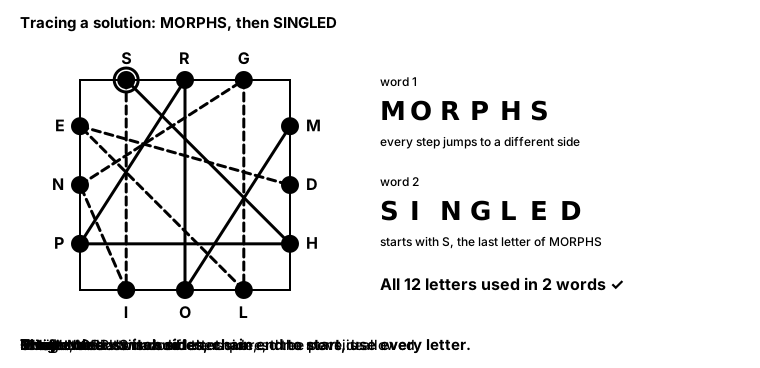
I first wrote a solver for this in 2022, as a Java assignment for CS 112. Since then, the same algorithm has lived in a browser tab, in a Node.js cloud function, in a Go cloud function, and finally back in the browser, now with a GPU helping out. You can try the current version in your browser.
This post follows that path. Each move traded one problem for another. The last move was possible because of two changes that don’t depend on where the code runs: representing letters as bits, and doing work before the search starts rather than during it.
The First Solver: Backtracking
The core algorithm hasn’t changed much since the assignment. It’s recursive backtracking: build a solution one letter at a time, and whenever the partial answer breaks a rule, undo the last letter and try the next option.
At each step, the solver considers adding each of the 12 letters to the current word, and immediately rejects the letter if:
- it’s on the same side as the previous letter,
- the current word plus that letter isn’t the start of any dictionary word, or
- it would finish a word that’s already been used.
It can also end the current word, if it’s a real word of three or more letters, and start the next word with the same letter.
The “start of any dictionary word” test does most of the pruning. The dictionary is loaded into a map where every prefix of every word is a key: “M”, “MO”, “MOR” and so on map to “prefix only”, while complete words like “MORPH” map to “full word”. If “MRX” isn’t in the map, no word starts that way, and the solver never explores anything beneath it.
On top of this, the solver uses iterative deepening. It first looks for a one-word solution, then two words, then three, up to five. So the first solution it finds is also one of the shortest in words. The app calls this Solve.
After a solve, the button turns into Find Best. Among solutions with the fewest words, it finds the one with the fewest total letters. Solve might return MORPHS SHIELDING, while Find Best returns MORPHS SINGLED. Find Best is much more expensive: instead of stopping at the first solution, it has to rule out every other one.
Where the Solver Runs
The algorithm stayed the same, but where it ran changed four times. The animation below follows the solver from the browser’s main thread to the cloud and back to a Web Worker:
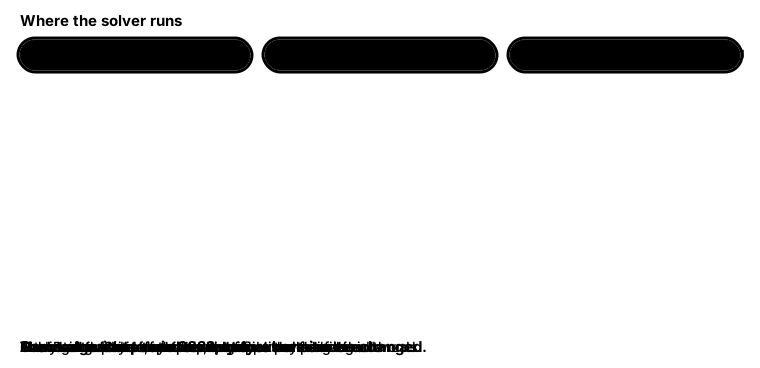
| When | Where it runs | What it fixed | What it cost |
|---|---|---|---|
| Spring 2022 | Java, command line | — | No interface |
| 2022 | TypeScript on the browser’s main thread | A visual, shareable app | Hard puzzles froze the page |
| May 2023 | Node.js on Google Cloud Functions | No more freezing | Network latency, a server to maintain |
| June 2023 | Go on Google Cloud Functions | Lower latency, gzipped responses | Still a network round trip |
| April 2026 | TypeScript in a Web Worker, plus WebGPU | No network, no freezing | Depends on the user’s device |
On the main thread
The first web version ran the solver directly in the page’s JavaScript, alongside every button click and repaint. JavaScript in a browser tab runs on one main thread, so while the solver was searching, nothing else could happen: the page couldn’t repaint, and buttons stopped responding until the search finished.
In the cloud
The fix in 2023 was to move the solver to a Google Cloud Function. The browser sends the puzzle’s letters, the server solves it, and the answer comes back. My README at the time put the tradeoff this way:
Significant reduction in client RAM and CPU load in exchange for slightly increased response time.
This fixed the freezing completely, since the browser was only waiting on a network request. A Web Worker, covered below, would have fixed it without a server, but I didn’t know about them at the time. With the server, every solve paid for a network round trip, plus a cold start whenever the function hadn’t run recently and the cloud provider had to start a fresh instance. A month later I rewrote the function in Go, which typically starts up and runs CPU-heavy code faster than Node.js, and I gzipped the responses to cut transfer time.1
Back in the browser
By 2026, running the solver locally looked attractive again, for three reasons:
- Web Workers. A Web Worker runs JavaScript on a separate thread. The page sends it a message, and the worker runs the solver and posts a message back. The main thread never blocks, which fixes the original freezing without a server.
- WebGPU. Browsers can now run general-purpose programs on the GPU through WebGPU.2
- A faster solver. Before moving it back, I rewrote the core data structures so that the work itself got much smaller, which is what the next two sections cover.
With the solver local, there’s no network round trip, no cold start, and no server bill. The cost is that the solve speed now depends on the user’s device, which is why the worker falls back to the CPU when a GPU isn’t available.
Bitmasks
The old Go solver stored letters as strings and answered every question by searching them. To test whether two letters sat on the same side, it went through the four sides and searched each side’s string for both letters. To test whether a solution used all twelve letters, it took each letter in turn and searched every word for it:
func (ls *LetterSquare) allLettersUsed() bool {
	for _, letter := range ls.letters {
		anyWordHasLetter := false
		for _, word := range ls.words {
			if strings.Contains(word, letter) {
				anyWordHasLetter = true
				break
			}
		}
		if !anyWordHasLetter {
			return false
		}
	}
	return true
}
There’s nothing wrong with this code, but the solver asks these questions millions of times. A puzzle has exactly twelve letters, and a 32-bit integer has room for all of them. Give each letter an index from 0 to 11, and represent “which letters does this word use?” as a number where bit i is set if letter i appears. That number is called a bitmask.
Combining two words’ masks shows which letters they use together:
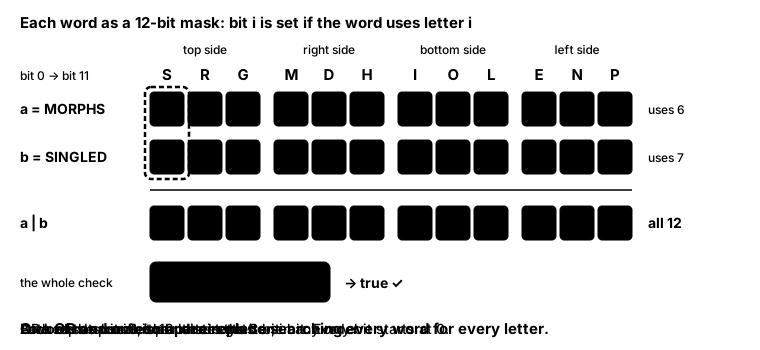
With masks, “do these words use every letter?” becomes a single comparison:
(a.coverageMask | b.coverageMask) === allCoveredMask; // 0xFFF
The same idea handles sides. The solver precomputes a small table, sideOf[letterIndex], so “are these two letters on the same side?” is two array lookups and a comparison instead of eight string searches.
Adding a letter to a word’s mask only takes an OR of its bit, but removing a letter during backtracking is harder. If the word is “SEES” and you remove the last S, the S bit must stay set, because another S is still there. A mask records whether a letter appears, not how many times. So the solver rebuilds a word’s mask from its remaining letters whenever it backtracks, which is cheap because words are short.
Precomputation
The second idea is precomputation: anything that doesn’t depend on the search should be computed once, before the search starts.
The largest saving comes from the dictionary. The full word list has 26,648 words, but most of them can’t be used in any given puzzle. A word containing a letter that isn’t on the square can never appear in a solution. Neither can a word where two consecutive letters come from the same side. Filtering those out, along with words shorter than three letters, leaves a much smaller list.
For one puzzle, the three filters reduce the dictionary as follows:
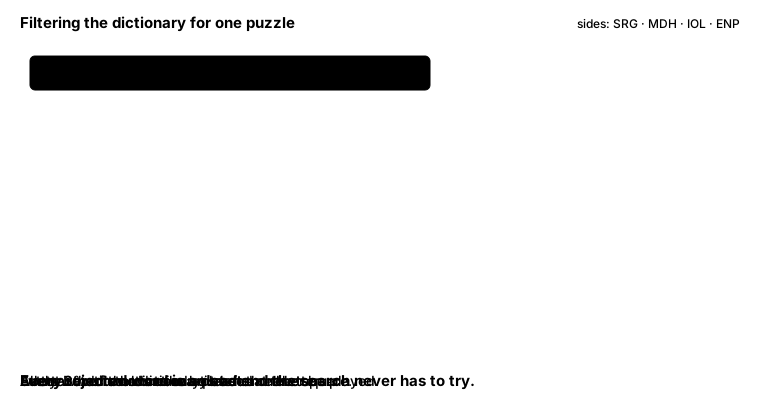
Only about 1 to 2% of the dictionary survives, and the solver searches only those words.3 For each surviving word, it works out up front the facts the search keeps asking about: which letters the word uses (as a bitmask), and which letters it starts and ends with. It stores them alongside the word:
interface ValidWord {
  word: string; // "MORPHS"
  coverageMask: number; // which puzzle letters it covers, one bit each
  firstLetterIdx: number; // which first-letter list it belongs to
  lastLetterIdx: number; // which list the next word must come from
}
A few more precomputations follow the same pattern:
- Letter lookups are small arrays, built once per puzzle, that give each letter’s position in the puzzle, its bit, and its side. Answering any of those questions is a single array read instead of a string search.
- An index by first letter keeps one list per puzzle letter (twelve in all), holding the valid words that start with it. When the next word must start with
S, the solver readsS’s list and only considers those words. - A per-puzzle cache keeps the filtered word list, so pressing Find Best after Solve doesn’t redo the filtering.
Find Best on the GPU
With words precomputed and masks in place, Find Best can think in whole words instead of letters. A candidate solution is a chain of words, and extending a chain means appending a word whose first letter matches the chain’s last letter.
This problem suits a GPU well. A GPU is best at running the same small program thousands of times in parallel, each on different data, with no copy needing to talk to another. Checking whether one word extends one chain is exactly that kind of task.
One thread per pair
The WebGPU version launches one GPU thread for every (chain, word) pair, from a compute shader, a small program the GPU runs once per thread. In the first pass, each chain is a single word, so with 565 valid words that’s about 565 × 565 ≈ 320,000 threads. Each thread asks three questions:
- Does this word start with the chain’s last letter? If not, stop.
- Is this word already in the chain? If so, stop.
- OR the masks together. If the result covers all twelve letters, it’s a solution. Otherwise, if the chain is still short enough, it’s a candidate for the next pass.
In a single pass, each thread either stops early or writes its extended chain to one of two lists:
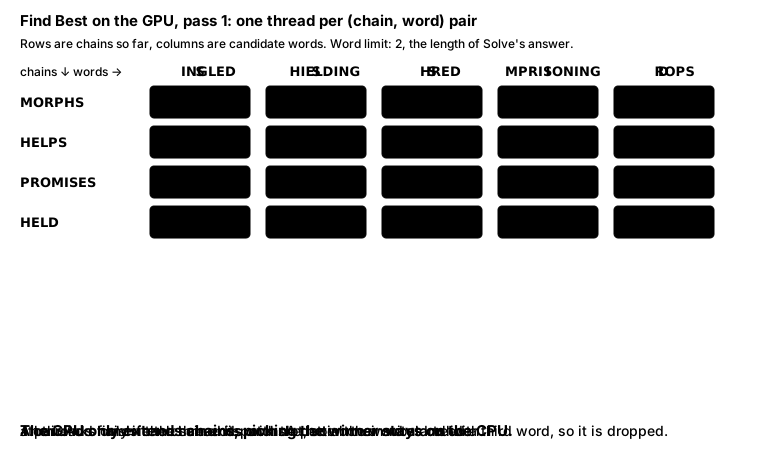
The core of the shader, written in WGSL, WebGPU’s shading language, performs those three checks:
if (lastWord.lastLetterIdx != newWord.firstLetterIdx) { return; }

var nc = chain;
nc.words[chain.wordCount] = wordIdx;
nc.coverageMask = chain.coverageMask | newWord.coverageMask;
nc.lastWordIdx = wordIdx;
nc.wordCount = chain.wordCount + 1u;
nc.totalChars = chain.totalChars + newWord.charCount;

if (nc.coverageMask == uniforms.targetMask) {
  let slot = atomicAdd(&counts[0], 1u);
  if (slot < arrayLength(&solutions)) { solutions[slot] = nc; }
} else if (nc.wordCount < uniforms.maxWords) {
  let slot = atomicAdd(&counts[1], 1u);
  if (slot < arrayLength(&nextChains)) { nextChains[slot] = nc; }
}
Threads also need a safe way to write their results, because thousands of them may find a solution at the same moment, and they can’t all write to the same spot. Each one calls atomicAdd on a shared counter, an atomic operation that hands out slot numbers one at a time, guaranteeing no two threads get the same slot. Each thread then writes its chain into its own slot.
Pass by pass
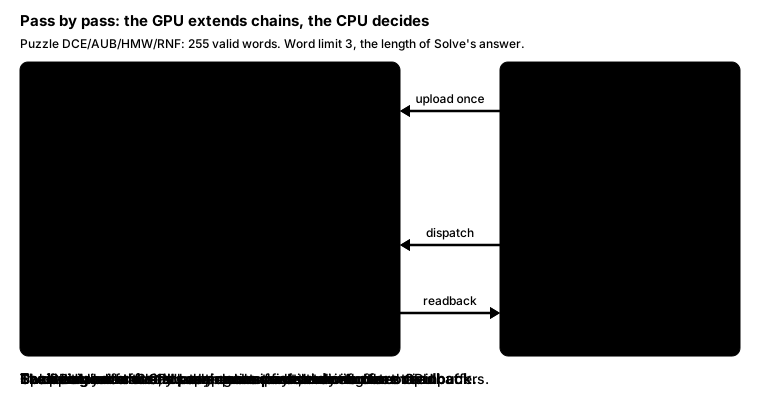
The chains never leave the GPU, which keeps traffic between the CPU and GPU to a minimum. Each pass writes its new chains into a buffer that the next pass reads as its input, so nothing is read back or uploaded again. After each pass, the CPU reads back only the two counters, plus any solutions, in a single copy. The search goes level by level: all two-word chains, then all three-word chains, and so on. It stops at the first level that produces any solution, since those have the fewest words.
The GPU doesn’t pick the winner. Instead, once a pass returns its solutions, the CPU scans them once, keeping the one with the fewest total letters and breaking ties alphabetically. A single pass over the results is cheap for the CPU, and doing it on the GPU would add complexity for little benefit.
In a different puzzle, the first solutions only appear on the second pass:
When there’s no GPU
Not every browser or device supports WebGPU. Without it, or when a pass produces more chains than the GPU’s buffers can hold, the worker runs the same search on the CPU. It uses the same filtered words, masks, and first-letter index, and it also goes one level at a time: all one-word chains, then all two-word chains, and so on up to five, stopping at the first level with a solution.
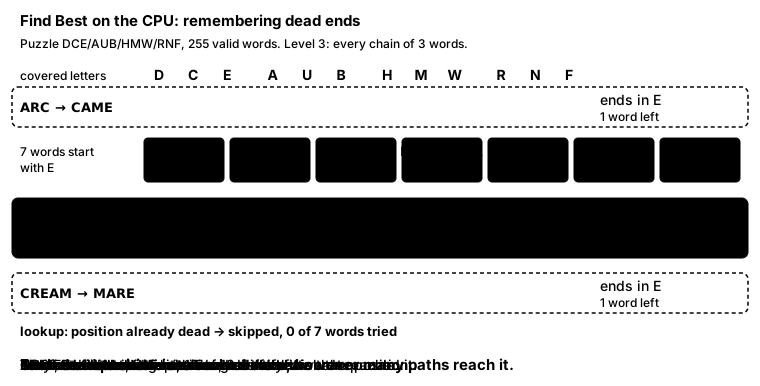
The CPU version also remembers dead ends, a form of memoization. A partial chain’s future depends only on three things: its last letter, the letters it has covered so far, and how many words it has left. Together, those three make up the chain’s position.
Once the search learns that a position is a dead end, it skips every later chain in the same position, however that chain got there. For example, if no single word can finish a chain that ends in E and covers C, E, A, M, and R, any other chain with that ending and those letters is skipped too.
The number of possible positions is small:
- 12 possible last letters, one for each letter on the square (4 sides × 3),
- 4,096 possible sets of covered letters, since each of the 12 letters is either covered or not (),
- one to four words left, since the first of up to five words is already placed.
Multiplied together, that’s at most 196,608 positions. The solver stores one byte per position, so the whole table takes under 300 KB.4
The animation below shows one dead end being recorded and then reused:
Tradeoffs
The local architecture comes with a few tradeoffs:
- Bounded memory on the GPU. Result buffers have a fixed size, derived from the device’s limits. If a pass produces more chains than fit, the GPU drops the extras and the worker re-runs the search on the CPU. In practice, filtering keeps the counts well within bounds, but it’s a real limit.
- One round trip per pass. Every pass ends with a readback, because the CPU decides whether to stop and ranks the solutions. Each readback has a fixed cost, however little it carries, so a puzzle that needs more words pays once for every extra pass.5 In exchange, the shader only extends chains, and the stopping and ranking logic stays in ordinary TypeScript.
- Brute force over branching. The GPU tests every chain against every word, even though most pairs fail the first-letter check. The CPU version uses the first-letter index to skip them. On a GPU, simple and uniform work usually runs faster than branching code, because threads in a group run in lockstep, executing the same instruction together. The brute-force version is also far easier to get right.
- Device-dependent speed. A cloud function runs on the same hardware for everyone, while a local solver is only as fast as the user’s laptop or phone. The CPU fallback makes sure devices without WebGPU still get an answer.
Looking Back
Most of the speedup came from the algorithm, not from where the solver ran. The cloud function didn’t solve puzzles any faster. It kept the page responsive while the user waited on the network. Running in the browser again only worked because bitmasks and filtering had shrunk the work enough for the user’s own device.
Where the solver ran depended as much on what I knew as on what browsers offered. In 2022, it ran on the main thread and froze the page. In 2023, I reached for a server because I didn’t know Web Workers existed. By 2026, I did, and WebGPU had arrived to let Find Best run on the GPU.
I also started a Rust version at the end of 2023, but abandoned it before it did anything useful. ↩︎
Chrome shipped it in 2023, and Safari and Firefox followed in 2025. ↩︎
For the three puzzles I checked, 255, 565, and 580 words survive. ↩︎
Even a puzzle with no solution in five words is ruled out in a few milliseconds. ↩︎
A readback copies the data into a buffer the CPU can map, then waits on
mapAsync. Each one costs about 100 ms in Firefox on my machine. ↩︎