Tinkering with Spark
Background
In the summer of 2022, I interned at Shopee as a product analyst on the Search and Recommendation (SnR) data team. My primary responsibility was to deliver reliable and actionable analytics for product managers. Because we frequently ran large-scale queries throughout the day, any job delays or failures directly impacted reporting timelines and slowed progress toward feature improvements or releases.
Our main tools for data processing and querying were Presto and Apache Spark, supplemented by internal tools that abstracted away much of the underlying engineering complexity.
During my time there, there were some noticeable job failures and delays such that deadlines were unnecessarily pushed back. While I will analyze specific causes and fixes in a later section, an important backdrop was the company-wide resource shortage at the time. It was incredibly expensive to acquire compute resources, and the demand for compute due to increased workloads far outpaced the supply. This was especially challenging for the SnR team, where ML engineers were running intensive experiments on recommendation models that consumed substantial processing power.
Before we dive into the issue, I will first introduce the key technologies involved—namely Spark and YARN.
What is Spark?
Apache Spark, originally developed as a research project in UC Berkeley and now maintained by the Apache Software Foundation, is an open-source distributed processing framework for large-scale data workloads. It leverages in-memory caching and optimized query execution to deliver high performance for analytic queries across massive datasets.
Spark was designed to overcome the limitations of MapReduce, which relies on a sequential, multi-step process susceptible to disk I/O latency. With Spark, data is read into memory, operations are performed, and results are written back—all in a streamlined process that avoids repeated disk access. The performance gains come primarily from Spark’s efficient use of in-memory data structures, such as Resilient Distributed Datasets (RDDs) and later DataFrames.
Today, Spark is widely used for machine learning, real-time analytics, interactive queries, and graph processing, making it a cornerstone of modern data engineering and analytics.
What is YARN?
YARN, short for Yet Another Resource Negotiator, is Hadoop’s cluster resource management framework. Fun fact: “Yet Another” is an idiomatic qualifier programmers often use to acknowledge that many systems are incremental variations of existing ones—other examples include Yacc (Yet Another Compiler-Compiler) and YAML (Yet Another Markup Language).
Although I will not discuss YARN optimization in detail here, it is important to understand its role. Modern data architectures often run on clusters with thousands of nodes, where a single centralized controller cannot effectively manage the scale and complexity of resource allocation. YARN addresses this by separating resource management from job scheduling and monitoring.
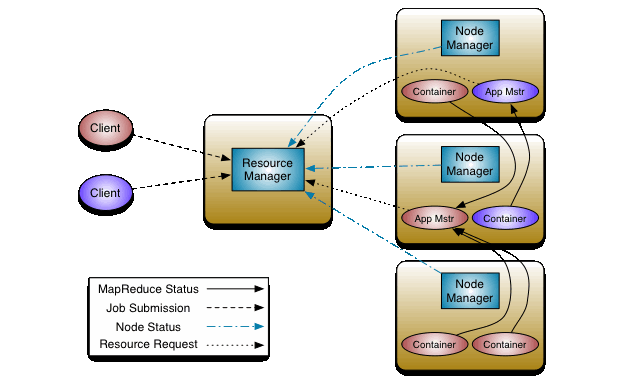
At its core, YARN consists of a global ResourceManager (RM) and per-node NodeManagers (NMs).
The ResourceManager contains two key components:
- Scheduler – Allocates resources among competing applications without tracking their execution state.
- ApplicationsManager – Accepts job submissions and launches the per-application ApplicationMaster (AM).
The ApplicationMaster negotiates resources from the Scheduler, manages task execution, and handles application-level fault tolerance and recovery in coordination with the NodeManagers.
Running Spark on YARN
Running Spark on YARN allows multiple frameworks (not just Spark) to dynamically share and centrally configure the same cluster resources. YARN’s schedulers handle categorization, isolation, and prioritization of workloads, ensuring resources are efficiently allocated instead of sitting idle. In short, YARN is one of the most widely used cluster managers for running large-scale Spark applications.
Components
Spark Driver
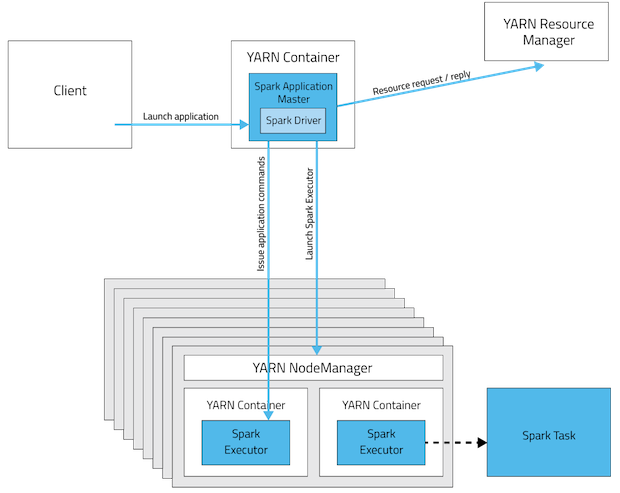
Each Spark application has a single driver, which runs within the ApplicationMaster for the duration of the job. The driver coordinates the entire application lifecycle: it manages job flow, schedules tasks, and translates the program into a directed acyclic graph (DAG) of execution steps across the cluster.
Spark Executor
Spark executors run inside YARN containers. Each executor:
- Executes multiple tasks over its lifetime (potentially in parallel).
- Resides on a node, with each node potentially hosting multiple executors.
- Is provisioned with fixed resources (CPU cores and memory) determined at application launch.
Cores
Cores represent CPU resources allocated to the driver and executors. Increasing cores per executor can improve parallelism but also increases memory requirements.
Memory
Memory allocations are split into two segments:
- On-heap process memory – for objects, data structures, and operations.
- Off-heap (non-heap) memory – for JVM overhead, native libraries, and other system uses.
Thus, total memory requested for a driver or executor is calculated as: memory + memoryOverhead
The Issue
From the logs, most failures stemmed from out-of-memory (OOM) and timeout errors, leading to delays from self-restarts. In some cases, applications experienced prolonged waiting times before executors were allocated, while in others, executors simply took an excessive amount of time to finish each stage—both of which often cascaded into timeouts. My task became twofold: (1) eliminate errors and (2) improve processing time.
To investigate, I first examined the default Spark configuration (filtered for relevant parameters):
spark.dynamicAllocation.initialExecutors=0
spark.dynamicAllocation.minExecutors=0
spark.dynamicAllocation.maxExecutors=100
spark.driver.cores=1
spark.driver.memory=5g
spark.driver.memoryOverhead=2g
spark.driver.maxResultSize=2g
spark.executor.cores=1
spark.executor.instances=10
spark.executor.memory=16g
spark.executor.memoryOverhead=4096M
spark.default.parallelism=400
spark.sql.shuffle.partitions=400
...
From this, we can extract the following setup:
- Driver: 1 core, 5GiB memory (+2GiB overhead)
- Executors: 10 instances, each with 1 core, 16GiB memory (+4GiB overhead)
I reviewed the Spark configuration documentation to understand the other parameters and scoured the Internet for possible causes of the observed errors.
Closer inspection of the logs revealed a clear pattern: driver OOM errors consistently occurred during Broadcast Joins. Further research pointed me to a reported Spark Issue describing this exact behavior. In short, before broadcasting, the driver must collect results from executors, and in some cases the returned data exceeded the driver’s working memory (5GiB), causing the OOM crash.
The Fix
For processing speed, the solution appeared straightforward: increase the number of cores per executor to improve throughput by spawning more threads. Most sources suggested a range between 2 and 5, so I chose 4, an arbitrary but reasonable middle ground. While this increased memory consumption, the default 16GiB of executor memory handled the added concurrency well in trial runs.
Next, I addressed driver OOM errors by increasing driver memory. The challenge was determining an appropriate limit. With container memory at 102GiB, subtracting a 10% overhead left roughly 92GiB of working memory. To stay safe, I capped the driver allocation at about 50% of that, or 48GiB. I began conservatively with 16GiB, mirroring the executor memory, and found that OOM errors disappeared in subsequent runs—so I retained that value.
In the end, the effective configuration overrides were:
--executor-cores 4
--driver-memory 16g
Other Considerations
I also experimented with other default parameters mentioned earlier. After many iterations with different combinations, I discarded most of them since they did not produce meaningful improvements. For example, adjusting spark.sql.shuffle.partitions and spark.default.parallelism only benefited a small subset of jobs, as their effectiveness depended heavily on factors like data skew and the number of joins in each query.
Another case was the number of executors (--num-executors). In theory, specifying this value should have forced YARN to allocate executors consistently and reduced idle wait times. In practice, however, the YARN queues were so congested during peak hours that executors were often reallocated from ongoing runs to higher-priority workloads, such as ML experiments.
Finally, in rare situations where increasing driver memory still led to crashes, I found that raising the number of driver cores (e.g., --driver-cores 4) mitigated the issue. I cannot fully explain why this worked, but it appeared to stabilize execution in those cases.
Room for Improvement
Although I followed an iterative cycle of consolidating evidence, forming hypotheses, and implementing fixes, my approach was somewhat messy. In retrospect, I should have been more systematic in documenting changes. For instance, I could have recorded the run times of each Spark job under different configurations in a spreadsheet, making it easier to compare results and refine adjustments. Instead, I applied the same overrides across all jobs in search of a general solution. This proved unproductive, and while I eventually made targeted adjustments to a few jobs, I had to deprioritize the project to focus on more urgent tasks.
Closing Thoughts
This endeavor was a valuable learning experience. Although fixing Spark pipelines was outside the scope of my responsibilities as a product analyst intern, I recognized the significant operational impact of leaving the issue unresolved and proposed addressing it. I’m grateful to my team and manager for granting me the flexibility and trust to pursue this side project. Given my limited understanding of systems at that time, I had to learn everything from scratch. While I achieved tangible results, progress came through continuous iteration and learning from mistakes. I also discovered that there is is no one-size-fits-all solution—each Spark job or query is inherently unique, so improvements varied across jobs. Despite the challenges, I thoroughly enjoyed the process. I embraced failure as part of the norm, stayed open to experimentation, and ultimately developed an interest in systems that I pursued further in subsequent college semesters.
References
What is Apache Spark? | Introduction to Apache Spark and Analytics | AWS
Cluster Mode Overview - Spark 3.5.0 Documentation